Use cases
The following use cases represent situations in which Web developers see a need for a browser-based solution for working with responsive images.
Art direction
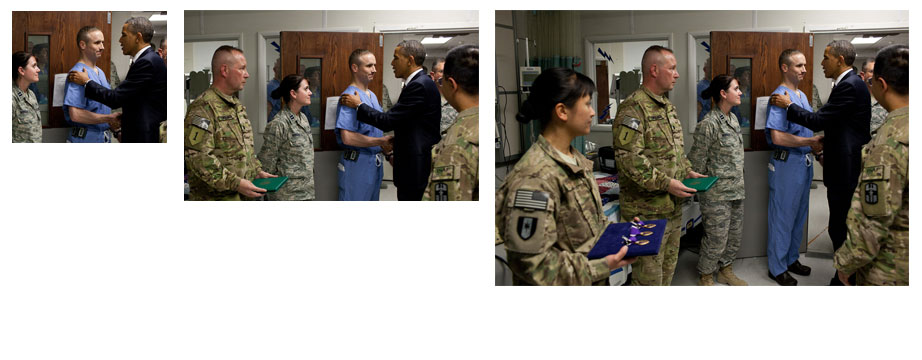
Web developers often need to provide different versions of the same image in order to communicate effectively across the wide range of screen resolutions and pixel densities available on today's devices. If the screen is small and the image is scaled down, its details cannot be seen. Conversely, if the screen is large a larger image that depicts more information can be shown.
For example, in the left-most image in Figure 1, it is difficult to discern the man's facial expressions, where in the center image his face and gestures are clear. The image on the far right show the poor quality of an over-scaled image.


In a responsive design, it is typical to change the crop of an image so it can be targeted towards the features of a particular display (or set of displays):
- On large screens, a large image (e.g. of a figure with a broad background) is shown..
- On smaller screens, shrinking the image can reduce its relevance, usefulness, and legibility.
This is illustrated in the figure below.
A related use case is when orientation determines the source of the image, the crop, and how text flows around the image based on the size of the viewport. For example, on the Nokia Lumia site where it describes the , the Nokia Lumia is shown . As the screen narrows, the Nokia Lumia is then shown . Bryan and Stephanie Rieger, the designers of the site, explained that on a wide screen, showing the full phone horizontally showed the browser best; but on small screens, changing the image to vertical made more sense because it allowed the reader to still make out the features of the browser in the image.
Design breakpoints
In Web development, a breakpoint is one of a series of CSS Media Queries that update the styles of a page based on logical matching of media features. A single breakpoint represents a rule (or set of rules) that determines the point at which the contents of that media query are applied to a pageâs layout. For example:
@media screen and (max-width: 16em) { ... }
@media screen and (max-width: 32em) { ... }
@media screen and (max-width: 41em) { ... }
Developers currently match specific breakpoints for images to the breakpoints that they have defined in the CSS of their responsive designs. Being able to match the breakpoints ensures that images are operating under the same rules that define the layout of a design. It also helps developers verify their approach by ensuring that the same viewport measurement tests are being used in both HTML and CSS.
If a breakpoint in the design is specified in as "max-width: 41em", then web developers would like to be able to define a similar breakpoint for images at a max-width of 41em and not have to translate that measurement into another unit like pixels even if it is possible to calculate that measurement:
- The default font size in most browsers is 16 pixels. So 41em can be calculated to be 41 * 16 = 656 pixels. Calculating this for every breakpoint, while possible, is tedious and potentially error-prone for developers.
- Unless the image break points support both max and min values, then the image breakpoint will need to be further modified from the layout breakpoint that it was derived from. For example, if the image format only supports minimum width tests, then instead of using a maximum width of 656 pixels, the document developer would need to specify 657 pixels as a minimum width for the breakpoint.
When debugging a document, if the developer cannot specify breakpoints for images in the same manner that they are defined for the design, developers will need to convert the breakpoints back to the values specified in the layout in order to verify that they match. This increases authoring time and the likelihood of errors on the part of developers.
Media types
Printed web documents generally have pixelated images due to printers having a higher DPI than most images currently served on the web. According to Wikipedia's article on "":
"An inkjet printer sprays ink through tiny nozzles, and is typically capable of 300-600 DPI. A laser printer applies toner through a controlled electrostatic charge, and may be in the range of 600 to 1,800 DPI."
Defining higher resolution images for printing would increase the abilities of web developers to define printed versions of their documents. For example, a photo sharing site could provide a bandwidth-optimized image for display on screen, but a high-resolution image for print.
Print, monochrome and high-contrast
Displaying a color image on monochrome media (e.g., paper and e-ink displays) can be problematic; different colors with similar luminosity are impossible to distinguish on monochrome media. Currently, server side solutions exist to adapt web content to e-ink displays. For example, . Or custom services have been created specifically for accessing popular websites, like . However, there is currently no convient means to change the source of an image for print media.
Additionally, Microsoft has proposed a , which would enable developers to know if the user agent is operating in a high-contrast mode. Knowing if the user agent is operating in high-contrast mode allows developers to serve appropriate images, which could potentially assists visually impaired users. To be able to use this feature with images on the Web, developers would currently need to rely on the problematic previously discussed.
Relative units
A common practice in creating flexible layouts is to specify the size values in media queries as relative units: em, rem, vw/vh etc. See, for example, Lyza Gardner's article . This approach is most commonly seen using ems in order to reflow layouts based on usersâ zoom preferences, or to resize elements through JavaScript by dynamically altering a font-size value.
In flexible layout designs, when a user zooms into a design, proportionally scaled images can be blurry or pixelated, affecting the image's impact and function. Swapping to a more suitable image is used to overcome this problem.
Dynamically acquired images data
There are cases where the image data is dynamically generated (e.g., using canvas element and related APIs) or is acquired from the device itself (e.g., from the camera on a phone or tablet). Developers need practical means to interface programmatically with the source of an image or a set of images. Without having a suitable API, it will be difficult for developers to manipulate the sources of images.
Image formats
Some images are best suited to a specific file type, for reasons such as file size optimization, alpha transparency, scalability, animation, etc. For example, a photo usually requires good color depth, but does not require alpha transparency or animation; JPEG or WebP are well-suited to these needs and offer good optimization between image quality and file size. Icons are often simpler in terms of colour depth, but may require alpha transparency; the PNG format is better-suited to these needs.
In a responsive design, images need to be displayed at different sizes. When possible, a vector format such as SVG might be most appropriate. There have also been proposals for new responsive image formats (see, for example, ).
Although a web developer may want to use a specific image format, new or otherwise, the browser may not always support it. Currently developers must often abandon the best image format in favor of one that has good support.